PlayDLY Benutzerhandbuch
Inhaltsübersicht
- Einrichtung
- DAW-Einrichtung
- Plugin-Schnittstelle
- Gebrauchsanweisung
- Voreinstellungen
- Technische Referenz
- Fehlersuche
- Neueste Version / Download
Einrichtung
Systemanforderungen
- macOS 10.13 oder höher
- 64-Bit Intel oder Apple Silicon Prozessor
- Host-DAW, die AU- oder VST3-Plugins unterstützt
- MIDI-Eingangsmöglichkeit (Hardware-Controller oder Software-MIDI)
Installation von PlayDLY
- DMG mounten: Doppelklicken Sie auf `PlayDLY-1.0.109.dmg`, um das Disk Image zu mounten.
- Kopieren Sie die Plugins nach:
Audio-Einheiten: `~/Library/Audio/Plug-Ins/Components/PlayDLY.component`
VST3: `~/Library/Audio/Plug-Ins/VST3/PlayDLY.vst3` - Starten Sie Ihre DAW neu, um das neue Plugin zu erkennen
Überprüfung der Installation
- Öffnen Sie Ihre DAW und suchen Sie nach "PlayDLY" in der Liste der Audioeffekte
- Das Plugin sollte unter den Kategorien "Algarve Sound & Vision" oder "Effekt" erscheinen.
- Wenn nicht gefunden, überprüfen Sie die Plugin-Scan-Einstellungen Ihrer DAW
DAW-Einrichtung
PlayDLY ist ein MIDI-gesteuerter Audioeffekt, der sowohl Audio- als auch MIDI-Routing erfordert.
IN FORTSCHRITT. ICH WERDE IN DEN NÄCHSTEN TAGEN VERWEISE AUF VIDEOS HINZUFÜGEN, DIE ERKLÄREN, WIE MAN DAS PLUGIN IN DEN VERSCHIEDENEN DAWS VERWENDET!
Abelton Live
https://www.youtube.com/watch?v=XGAXVAODFL0
Pro Tools
Cubase
Logik
Luna
https://www.youtube.com/watch?v=7jB3U86iFGE
Ausführlichere Informationen zum MIDI-Routing für Ihre DAW finden Sie hier:
https://www.overloud.com/node/166
Universal DAW-Tipps
- Latenzzeit: Verwenden Sie niedrige Puffergrößen (64-256 Samples) für Echtzeit-MIDI-Steuerung
- MIDI-Kanäle: PlayDLY antwortet auf alle MIDI-Kanäle
- Automatisierung: Die meisten Parameter können über Ihre DAW automatisiert werden
Plugin-Schnittstelle
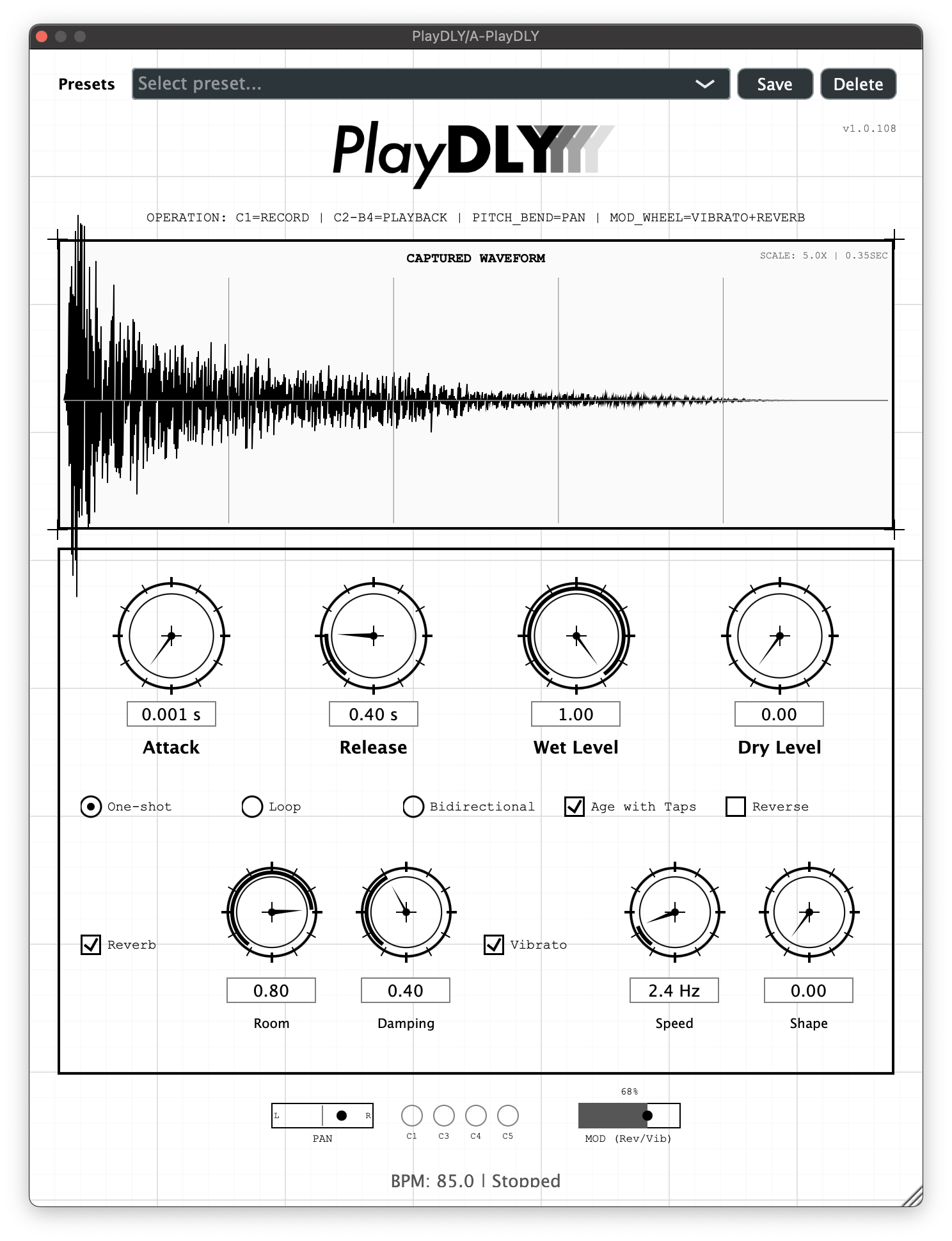
PlayDLY verfügt über eine Benutzeroberfläche im Blueprint-Stil mit mehreren Hauptbereichen:
Logo und Titel
- PlayDLY-Logo oben in der Mitte
- Rechts angezeigte Versionsinformationen
- Grundlegende MIDI-Implementierung unter dem Logo
Wellenform-Anzeige
- Echtzeit-Visualisierung der aufgenommenen Audiodaten
- Automatische Skalierung: Passt sich an, um die gesamte erfasste Wellenform anzuzeigen
- Anzeigen für den Wiedergabekopf: Vertikale Linien zeigen genau an, wo jede Stimme abgespielt wird
- Geschwindigkeitsabhängige Deckkraft: Leichte Töne erscheinen bei 10% Deckkraft, laute Töne bei 60%
- Mehrere Anzeigen: Zeigt bei polyphoner Wiedergabe alle aktiven Stimmen gleichzeitig an
- Tracking in Echtzeit: Die Wiedergabeköpfe bewegen sich beim Fortschreiten der Stimmen gleichmäßig über die Wellenform
Parameter-Steuerungen
Angreifen & Loslassen
- Attacke: 0,001-1,0 Sekunden - Steuert, wie schnell die Wiedergabestimmen eingeblendet werden
- Freigabe: 0.01-2.0 Sekunden - Steuert, wie schnell die Stimmen nach dem Ausklingen der Noten ausklingen
Nasse und trockene Niveaus
- Nass: 0-100% - Pegel des verarbeiteten (verzögerten) Tons
- Trocken: 0-100% - Pegel des Originaltons (Durchlass)
Kontrollkästchen für den Wiedergabemodus
- Einmalige Aufnahme: Spielt aufgenommene Audiodaten einmal ab und stoppt
- Schleife: Traditionelle Schleifenbildung (A→B, zurück zu A springen, wiederholen)
- Bidirektional: Ping-Pong-Schleife (A→B→A→B kontinuierlich)
- Alterung durch Antippen: Fügt der wiederholten Wiedergabe eine analoge Alterung hinzu
- Rückwärts: Spielt aufgenommenes Audio rückwärts ab
Reverb-Regler
- Nachhall: Ein/Aus-Schalter für den räumlichen Halleffekt
- Raum: 0-100% - Größe des Hallraums
- Dämpfung: 0-100% - Hochfrequenzdämpfung
Vibrato-Regler
- Vibrato: On/Off-Schalter für Amplitudenmodulation
- Geschwindigkeit: 0,1-20 Hz - Geschwindigkeit der Vibratoschwingung
- Form: 0-100% - Morphing zwischen Sinus (0%) und Rechteck (100%)
MIDI-Monitor (Unten)
- 4 kreisförmige Anzeigen für MIDI-Aktivität
- Echtzeit-Rückmeldung von MIDI-Notenanschlägen
- Pan- und Modulationsanzeigen, die auf MIDI Pitch Bend und Modwheel-Bewegungen reagieren
Voreingestelltes System (oben)
- Voreinstellungs-Dropdown mit Werksvoreinstellungen
- Laden/Speichern-Funktion für benutzerdefinierte Voreinstellungen
- Parametersynchronisation mit dem JUCE APVTS-System
Voreinstellungen
PlayDLY enthält mehrere Werkseinstellungen, die für verschiedene Anwendungsfälle optimiert sind:
Werkseitige Voreinstellungen
- Standard: Ausgewogene Einstellungen für den allgemeinen Gebrauch
- Helles Delay: Verstärkte hohe Frequenzen, mäßiger Nachhall
- Warmes Delay: Analoger Wärmegrad mit Bandsättigung
- Rückwärtsverzögerung (Bus): Optimiert für Send/Return-Nutzung mit Rückwärtswiedergabe
- Raum-Delay: Spatial Reverb mit Raumambiente
- Großer Raum: Große Raumsimulation mit langem Nachhall
- Langsam: Verlängerter Attack/Release für sanfte Übergänge
- Vibro: Ausgeprägte Vibrato-Effekte zur Modulation
Verwaltung von Voreinstellungen
- Laden: Aus Dropdown-Menü auswählen
- Abspeichern: Benutzerdefinierte Voreinstellungen speichern alle Parameterzustände
- Rückruf: Alle UI-Bedienelemente werden automatisch mit voreingestellten Änderungen synchronisiert
- Kompatibilität: Voreinstellungen funktionieren mit verschiedenen Plugin-Formaten
Technische Referenz
MIDI-Implementierung
Anmerkungen zur Kontrolle:
- C1 (MIDI 36): Aufnahme Start/Stop
- C2-C4 (MIDI 48-83): Wiedergabe mit chromatischem Pitching
Kontinuierliche Kontrolleure:
- CC1 (Modulationsrad): Vibrato-Tiefe + Reverb-Nasspegel
- Pitch Bend: Stereo Panning (eingefroren pro Stimme)
- Note Velocity: Dynamik der Stimme
Sprachverwaltung:
- Polyphonie: maximal 8 gleichzeitige Stimmen
- Stimmenklau: Älteste Stimme wird bei Überschreitung des Limits ersetzt
- Hüllkurve: Unabhängiger Attack/Release pro Stimme
MIDI-Notenbenennungskonventionen
Das ist wichtig: Verschiedene DAWs verwenden unterschiedliche Konventionen für die Benennung von MIDI-Noten. PlayDLY verwendet die häufigste Konvention, bei der das mittlere C = C3 (MIDI-Note 60) ist. Einige DAWs wie Protools, LUNA oder Reaper verwenden jedoch eine andere Konvention, bei der das mittlere C = C4 oder sogar C6 ist, was bedeutet, dass alle Noten in ihrer Oberfläche in einer anderen Oktave erscheinen.
Note Mapping über verschiedene DAWs hinweg:
| Funktion | PlayDLY-Etikett | MIDI-Note # | Standard-DAWs (Logik/Live) | LUNA/Protools |
| Datensatz | C1 | 36 | C1 | C2 |
| Saubere Wiedergabe | C2-B2 | 48-59 | C2-B2 | C3-B3 |
| Warmes Playback | C3-B3 | 60-71 | C3-B3 | C4-B4 |
| Gesättigt | C4-B4 | 72-83 | C4-B4 | C5-B5 |
Wichtigster Punkt: Unabhängig davon, wie Ihre DAW die Noten beschriftet, drücken Sie die Tasten wie in der PlayDLY-Oberfläche angezeigt. Die physischen Tasten auf Ihrem MIDI-Keyboard bleiben gleich - nur die Beschriftung unterscheidet sich zwischen den DAWs.
Audio-Verarbeitung
Aufnahmesystem:
- Hybride Puffer: Echtzeit-Erfassung + stabile Wiedergabe
- Sicherheitsspannen: Verhindert Störungen bei gleichzeitiger Aufnahme/Wiedergabe
- Längenbegrenzung: 16 Sekunden oder maximal 4 Takte
Wirkungskette:
1. Tonhöhenverschiebung: Chromatische Tonhöhenverhältnisse für jede Note
2. Tape-Sättigung: Harmonische Verzerrung im analogen Stil
3. Vibrato: Amplitudenmodulation mit morphbaren Wellenformen
4. Nachhall: Spatial Processing mit Raummodellierung
5. Hüllkurve: Attack/Release-Formung pro Stimme
Leistung:
- Verarbeitung in Echtzeit: < 10ms Latenzzeit typisch
- CPU-Belastung: Optimiert für Live-Performance
- Speicher: Dynamische Zuweisung basierend auf der Aufzeichnungslänge
Fehlersuche
Gemeinsame Probleme
Plugin nicht in DAW gefunden
- Überprüfen, ob Installationspfade vorhanden sind
- DAW nach der Installation neu starten
- Plugin-Scan-Einstellungen der DAW überprüfen
- Sicherstellung der Kompatibilität mit der macOS-Version (10.13+)
Keine MIDI-Antwort
- MIDI-Routing in der DAW überprüfen
- Überprüfen Sie, ob der MIDI-Eingang für das Plugin aktiviert ist.
- Test mit einfachem MIDI-Controller
- MIDI-Kanal-Einstellungen überprüfen
Audioaussetzer oder Störungen
- Verringern Sie die DAW-Puffergröße auf 128-256 Samples
- Unnötige Anwendungen schließen
- CPU-Auslastung im Aktivitätsmonitor prüfen
- Deaktivieren Sie andere CPU-intensive Plugins
Klicken im Schleifenmodus
- Stellen Sie sicher, dass Sie v1.0.107 oder höher verwenden.
- Prüfen Sie, ob die Schleifengrenzen richtig gesetzt sind.
- Überprüfung der Integrität des Audiopuffers
Reverb oder Vibrato funktionieren nicht
- Prüfen Sie, ob die Effekte über Kontrollkästchen aktiviert sind.
- Überprüfen, ob das Modulationsrad CC1-Daten sendet
- Test mit verschiedenen MIDI-Controllern
- Überprüfen der Parameter Automatisierungskonflikte
Unterstützung erhalten
Wenn Sie für das Plugin gespendet haben:
Bitte kontaktieren Sie uns über das Kontakt-Formular.
Feedback zum Beta-Test
- Meldung von Problemen an das Entwicklungsteam
- DAW-Version und Systeminformationen einbeziehen
- Schritte zur Reproduktion von Problemen bereitstellen
- Gemeinsame Nutzung von Projektdateien, wenn möglich
System-Informationen
- macOS-Version: Prüfen Sie im Apple-Menü > Über diesen Mac
- DAW-Version: Prüfen Sie im Über-Dialog der DAW
- Plugin-Version: Wird in der PlayDLY-Schnittstelle angezeigt
- MIDI-Controller: Marke/Modell angeben
Tipps zur Leistung
Optimale Einstellungen
- 128-256 Probenpuffergrößen verwenden
- Aktivieren Sie die Hardware-Beschleunigung in der DAW
- Ungenutzte Plugin-Funktionen deaktivieren
- Überwachung der CPU-Nutzung während der Leistung
MIDI-Optimierung
- Verwendung dedizierter MIDI-Spuren für komplexe Sequenzen
- Vermeiden Sie übermäßige Pitchbend- oder Modulationsraddaten
- Aufzeichnung von MIDI-Patterns für konsistente Wiedergabe
- Berücksichtigen Sie die MIDI-Quantisierung für ein genaues Timing
Die neueste Version
Automatische wöchentliche Überprüfung: PlayDLY sucht einmal pro Woche automatisch nach Updates, wenn Sie die Plugin-Oberfläche öffnen, ohne dass Ihr Arbeitsablauf unterbrochen wird.
Manuelle Prüfung: Klicken Sie auf die Versionsnummer (z. B. "v1.0.111") in der oberen rechten Ecke des Plugin-Fensters, um sofort nach Updates zu suchen.
Update-Benachrichtigung: Wenn eine neue Version verfügbar ist, wird unter der Versionsnummer der Text "Update verfügbar" angezeigt. Klicken Sie auf diesen Text, um den Aktualisierungsdialog zu öffnen.
Dialog aktualisieren: Der Dialog zeigt Ihre aktuelle Version, die neue verfügbare Version und einen direkten Link zum Herunterladen der neuesten Version von der PlayDLY-Website an.
Datenschutz und Netznutzung
Die Aktualisierungsprüfung stellt etwa einmal pro Woche eine einzige, einfache Anfrage an unseren Server. Es werden keine persönlichen Informationen oder Nutzungsdaten übertragen - das Plugin ruft lediglich die neueste Versionsnummer ab. Netzwerkausfälle werden zuverlässig behandelt und beeinträchtigen den Betrieb des Plugins nicht.
Herunterladen
Sie können die neueste Version hier herunterladen. Bitte denken Sie daran, dass sich PlayDLY noch in der Beta-Phase befindet, so dass es bei der Nutzung zu Fehlern kommen kann. Bitte melden Sie alle Fehler, die Sie finden, über die Kontakt-Formular! Danke!